
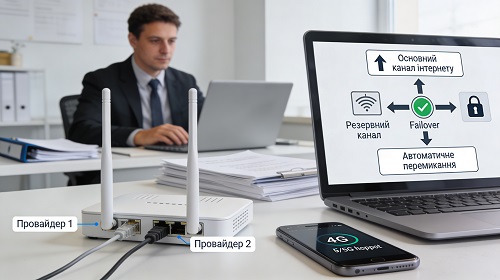
Backup Internet for Office or Home
A stable internet connection is essential for modern businesses and home offices. Most business processes today depend on online access, including corporate systems, email, cloud services, online banking, accounting systems, and remote server access.
If the primary internet provider fails, a company may face business downtime, inability to process orders, access documents, or communicate with clients. That is why implementing a backup internet connection is a critical part of a reliable IT infrastructure.
A backup connection ensures uninterrupted operations even in the event of technical issues with the main provider.
Main Ways to Set Up Backup Internet
Using a Secondary Internet Provider
One of the most common solutions is connecting a secondary internet provider. If the primary connection fails, traffic is automatically or manually switched to the backup channel.
Backup internet can be organized through:
- a second wired connection
- fiber-optic internet
- mobile internet
- satellite connection
This approach minimizes the risk of complete network downtime.
Failover Router Configuration
Automatic switching between connections is achieved using a network router with failover functionality.
The router monitors the primary connection and automatically activates the backup channel if needed.
This ensures employees can continue working without interruptions, which is critical for business continuity.
Using Mobile Internet
Mobile internet is another effective backup option. It can be implemented using mobile routers or SIM cards in network devices.
This solution is ideal for:
- small offices
- home offices
- temporary workplaces
- emergency backup scenarios
Mobile connectivity allows quick restoration of network access.
Multi-WAN Network Setup
For larger offices, a multi-WAN network architecture is often used.
This setup allows multiple internet connections to operate simultaneously, managed by a router or gateway.
If one connection fails, traffic is automatically redirected to another, ensuring high availability and reliability.
Benefits of Backup Internet
Implementing a backup internet solution provides several key advantages:
- continuous operation during outages
- stable access to cloud services and systems
- reduced employee downtime
- improved IT infrastructure reliability
- fast recovery of internet access
For businesses that rely on online services, backup connectivity is a vital part of the network infrastructure.
Choosing the Right Backup Internet Solution
The best solution depends on company size, number of users, system requirements, and network load.
We help businesses implement backup internet for office or home, configure network equipment, set up automatic failover, and ensure stable connectivity.
A properly configured backup system prevents downtime and ensures uninterrupted access to business resources.
Conclusion
Backup internet is a critical component of a reliable office or home workspace.
It ensures continuous access to systems, prevents downtime, and supports uninterrupted business operations.
A comprehensive approach to backup connectivity helps build a stable and resilient IT infrastructure.