BlueStacks vs LDPlayer — Which Emulator Is Better
Short description: Compare BlueStacks and LDPlayer for Windows. Learn which Android emulator is better for Free Fire, PUBG Mobile, low-end PCs, high FPS gaming, and stable emulator performance.
When this comparison is useful
- You need to choose an Android emulator for Windows.
- You want to play mobile games on a PC.
- You need an emulator for a weak computer or laptop.
- You want stable FPS and low ping.
- You want to run Android applications on Windows.
Quick answer
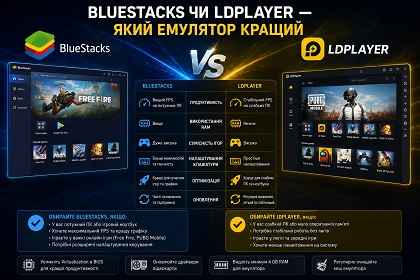
- BlueStacks is better for powerful PCs, maximum FPS, and wider compatibility.
- LDPlayer works better on low-end systems with lower hardware usage.
- For Free Fire and PUBG Mobile, many players prefer BlueStacks.
- For budget laptops, LDPlayer is often more stable.
What is BlueStacks?
BlueStacks is one of the most popular Android emulators for Windows. It supports Google Play, APK installation, high FPS gaming, advanced keyboard controls, and demanding mobile games.
BlueStacks is optimized for modern CPUs and NVIDIA or AMD graphics cards. It is widely used for Free Fire, PUBG Mobile, Mobile Legends, and other online games.
What is LDPlayer?
LDPlayer is a lightweight Android emulator designed for low-end PCs and laptops. It uses less RAM and CPU power, making it more stable on weaker systems.
LDPlayer is a good choice for older computers, office laptops, and systems with only 4 GB RAM.
Performance comparison
| Feature | BlueStacks | LDPlayer |
|---|---|---|
| FPS in Free Fire | Higher | More stable |
| Good for low-end PCs | Not always | Yes |
| RAM usage | Higher | Lower |
| Keyboard customization | More advanced | Simpler |
| Game compatibility | Very high | High |
| Stability on old PCs | Average | Better |
Which emulator is better for Free Fire?
For Free Fire, BlueStacks provides better graphics and higher FPS on powerful PCs. LDPlayer works better on weaker laptops where stability and lower resource usage are more important.
Which emulator is better for weak PCs?
If your computer has only 4 GB RAM or an older processor, LDPlayer usually performs faster and more smoothly. BlueStacks is recommended for systems with 8 GB RAM and modern graphics cards.
Useful tips
- Enable Virtualization in BIOS.
- Update NVIDIA or AMD graphics drivers.
- Allocate at least 4 GB RAM to the emulator.
- Use Smooth graphics settings on low-end PCs.
- Clear emulator cache regularly.
Common emulator mistakes
Many users allocate too little RAM or forget to enable Virtualization, causing lag and freezes. Another common issue is conflicts with Hyper-V in Windows or outdated graphics drivers.
Frequently asked questions
Which emulator is better for Free Fire?
BlueStacks for powerful PCs and LDPlayer for weaker systems.
Are both emulators free?
Yes, both programs can be used for free.
Which emulator uses less RAM?
LDPlayer uses fewer system resources.
Do they work on Windows 11?
Yes, both BlueStacks and LDPlayer support Windows 10 and 11.
Is Virtualization required?
Yes, it greatly improves FPS and emulator stability.
Why is the emulator lagging?
The cause may be weak hardware, outdated drivers, or incorrect settings.
Can I install APK files?
Yes, both emulators support APK installation.
Conclusion
BlueStacks is better for powerful PCs and maximum FPS in mobile games. LDPlayer is an excellent choice for weak computers and stable performance with lower hardware usage. The best emulator depends on your PC specifications and gaming needs.
Read also
Bookmarks
If this article was helpful, bookmark our Windows and software blog.
Press Ctrl + D