How to Use Victoria HDD
Short description: Learn how to use Victoria HDD to test HDD and SSD drives. Discover how to scan for bad sectors, check SMART values, and diagnose storage problems on Windows.
When this program is useful
- Your computer has become slow.
- The hard drive makes clicking or unusual noises.
- Windows freezes or shows disk errors.
- You need to scan a drive for bad sectors.
- You want to check HDD or SSD health.
The fastest way to test a drive
- Download Victoria HDD.
- Run the program as Administrator.
- Select the required drive.
- Open the SMART tab.
- Start the surface scan test.
What is Victoria HDD?
Victoria HDD is a popular disk diagnostic utility for HDD, SSD, and NVMe drives on Windows.
The software allows users to analyze SMART values, detect bad sectors, test read speed, and identify storage problems.
What Victoria HDD can do
- SMART diagnostics
- Surface scan testing
- Bad sector detection
- HDD speed testing
- Temperature monitoring
- Sector access time analysis
- Support for HDD and SSD drives
How to install Victoria HDD
- Download the program from the official website.
- Extract the archive or install the software.
- Run Victoria HDD as Administrator.
Most versions of Victoria HDD work without installation.
How to check SMART values in Victoria HDD
- Open the SMART tab.
- Click Get SMART.
- Review disk parameters.
Pay special attention to:
- Reallocated Sectors Count
- Current Pending Sector
- Uncorrectable Errors
- Temperature
- Power-On Hours
How to scan for bad sectors
- Open the Tests tab.
- Select Read mode.
- Click Start.
- Wait until the scan is complete.
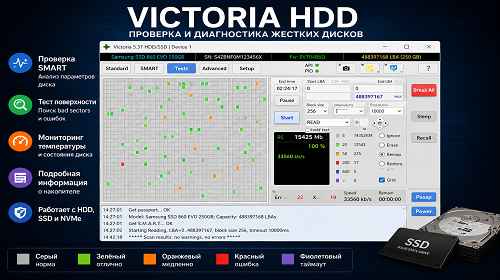
During the scan, Victoria HDD checks read speed and highlights problematic disk sectors.
What the colors mean in Victoria HDD
- Gray — normal sectors
- Green — fast sectors
- Orange — slow sectors
- Red — bad sectors or damaged areas
Can bad sectors be repaired?
Victoria HDD includes Remap and Erase functions, but they should be used carefully. Incorrect usage may cause data loss.
Always create a backup before performing advanced disk operations.
Useful tips
- Run the software as Administrator.
- Do not test the drive under heavy system load.
- Check SMART values regularly.
- Do not ignore bad sectors.
- Use SSD storage for Windows whenever possible.
Frequently asked questions
Is Victoria HDD free?
Yes, the software can be used for free.
Does Victoria HDD work with SSD?
Yes, it supports HDD, SSD, and NVMe drives.
What are bad sectors?
They are damaged sectors on a hard drive.
Can SMART values be trusted?
Yes, SMART helps detect storage problems early.
Why is my drive slow?
The reason may be bad sectors or HDD wear.
Is it safe to use Remap?
Only if you understand the tool and have created a backup first.
Does Victoria HDD work on Windows 11?
Yes, modern versions support Windows 10 and Windows 11.
Conclusion
Victoria HDD is one of the best disk diagnostic tools for HDD and SSD drives on Windows. It helps detect bad sectors, analyze SMART values, and identify storage problems before complete drive failure occurs.
Read also
Bookmarks
If this article was helpful, bookmark our Windows and software blog.
Press Ctrl + D