Why Is the Disk Noisy in a Computer
Short description: Learn why a hard drive in a computer or laptop makes noise, which sounds are normal, and which may indicate HDD or SSD problems. Causes of clicking, grinding, buzzing, and vibration noises with practical solutions.
When this problem appears
- Your computer started buzzing or rattling.
- The hard drive makes clicking or scratching sounds.
- You hear strange noises while Windows is starting.
- Your laptop vibrates or becomes louder than before.
- The system has become slower.
The fastest way to check the problem
- Listen carefully to where the noise comes from.
- Check the SMART status using CrystalDiskInfo.
- Create a backup of important files immediately.
- Inspect HDD mounting inside the case.
- Scan the drive for errors.
Which hard drive sounds are normal
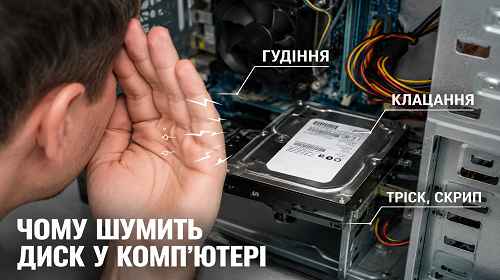
A regular HDD may produce a light working noise during operation. Soft buzzing, spinning sounds, or short data reading noises are completely normal for mechanical hard drives.
This is especially noticeable on older 7200 RPM HDDs where disk rotation speed is higher and slight vibration may occur.
Why an HDD becomes noisy
1. Mechanical wear
Over time, HDD bearings and moving components wear out. This can cause humming, vibration, grinding, or unusual noises.
2. Bad sectors
If the drive contains bad sectors, the HDD head may repeatedly try to read damaged data. This often creates clicking or repetitive sounds.
3. Loose HDD mounting
Sometimes the noise comes from case vibration. If the hard drive is not mounted properly, the computer may become much louder even when the HDD itself works normally.
4. Overheating
High temperature can also affect hard drive stability. This problem is common in laptops with poor cooling systems.
5. Insufficient power supply
An old or weak power supply unit may fail to provide stable power to the HDD. This can cause clicking sounds or repeated drive restarts.
Can an SSD make noise?
SSD drives have no moving parts, so SSD storage is almost completely silent. If the computer still makes noise after upgrading to SSD, the problem may come from cooling fans, the power supply, or case vibration.
How to check drive health
- CrystalDiskInfo
- Victoria HDD
- HD Tune
- CHKDSK in Windows
- SMART diagnostics
If the software shows Caution or Bad status, the drive should be replaced as soon as possible.
What to do if the HDD clicks
Clicking is one of the most dangerous symptoms for a hard drive. It may indicate damaged read/write heads or serious reading problems.
- Immediately copy important files.
- Do not repeatedly scan the drive.
- Do not reinstall Windows on the damaged HDD.
- Prepare for hard drive replacement.
How to reduce HDD noise
- Secure the HDD properly inside the case.
- Use anti-vibration mounting pads.
- Clean dust from the computer.
- Monitor HDD temperature.
- Replace an old HDD with an SSD.
Frequently asked questions
Is it normal for an HDD to make noise?
Yes, light buzzing and spinning sounds are normal for mechanical drives.
Why does the drive click?
The reason may be bad sectors or HDD mechanical failure.
Can an SSD make noise?
No, SSD drives are almost silent.
How do I check hard drive health?
Use CrystalDiskInfo or SMART diagnostics.
Should I replace a noisy HDD?
If the noise becomes louder or clicking appears, replacement is recommended.
Why is my laptop very loud?
The cause may be the HDD, cooling fans, or overheating.
Which is better — HDD or SSD?
SSD is faster, quieter, and more reliable for daily use.
Conclusion
Hard drive noise does not always mean failure, but loud grinding, clicking, or strong vibration may indicate serious HDD problems. It is important to monitor drive health, create backups regularly, and upgrade to SSD when necessary.
Read also
Bookmarks
If this article was helpful, bookmark our Windows and computer blog.
Press Ctrl + D