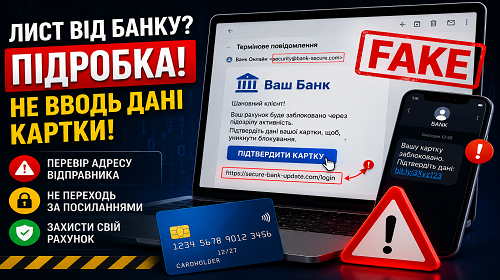
Fake Bank Emails: How to Detect Banking Scams and Protect Yourself from Financial Phishing
Short description: Learn how fake bank emails work, how to verify account suspension or card verification messages, and how to protect yourself from financial phishing attacks.
A fake bank email has become one of the most dangerous financial phishing methods in recent years. Cybercriminals have learned how to copy bank logos, email templates, official communication styles, and even sender addresses with impressive accuracy. Because of this, many users fail to notice the scam and voluntarily provide card information, passwords, or SMS verification codes.
Most financial phishing attacks rely on fear and urgency. Users receive messages claiming that their account has been blocked, a suspicious payment was detected, or card verification is required immediately. The email usually contains a login button or a link leading to a fake banking website. Once credentials are entered, scammers can gain access to the account within minutes.
Modern phishing emails and SMS messages often look almost identical to legitimate bank notifications. Some attackers even use fake domains similar to real bank websites or spoofed phone numbers to increase trust.
Below you will find practical methods for verifying banking emails, common phishing techniques, user mistakes, and several useful tricks that help identify fake banking websites quickly.
What Is Financial Phishing
Financial phishing is a type of fraud where attackers attempt to steal banking information through fake emails, websites, messages, or phone calls. Criminals usually pretend to represent banks, payment systems, or government services.
The primary goal is to trick users into entering card numbers, CVV codes, online banking passwords, or SMS confirmation codes. Once scammers obtain this information, money can disappear from the account within minutes.
Modern phishing attacks have become far more convincing because fake banking websites now closely resemble official platforms. In many cases, the only visible difference is the website domain name.
When the Risk of Fake Banking Messages Increases
Most users encounter phishing attempts after receiving emails or SMS messages about account suspension, suspicious transactions, or urgent card verification requests. Attackers intentionally create panic so users react quickly without checking the information carefully.
It is also risky to open banking emails while connected to public Wi-Fi networks or infected computers. Some malicious programs can even modify banking pages directly inside the browser.
People who rarely verify website addresses or frequently click links directly from emails are especially vulnerable to financial phishing.
Main Signs of a Fake Bank Email
- The message contains urgent requests to verify your account or card
- The email threatens account suspension
- The website address differs from the official bank domain
- The text contains grammar mistakes or strange wording
- The bank asks for CVV or PIN information
- The link redirects to an unfamiliar website
- The email comes from a suspicious sender address
- You are asked to update account information immediately
The Fastest Way to Verify a Banking Email
If you receive a message about account suspension or card verification, never open links directly from the email. The safest option is to manually open the official bank website in your browser or use the official banking app.
You should also carefully check the sender’s email address. Scammers often use domains with one modified character or extra words. For example, instead of bank.com they may use secure-bank-login.com or bank-support.net.
Another quick verification method is calling the bank using the phone number printed on the back of your card or listed on the official website.
Practical Ways to Protect Yourself from Financial Phishing
- The most important security rule is to never click links inside banking SMS messages or emails. Even if the message looks convincing, access your bank only through the official app or a manually typed website address. Many phishing websites differ from the real one by only a single character in the domain name.
- Enable two-factor authentication for both online banking and your email account. If attackers gain access to your email, they may intercept verification codes or reset banking passwords. It is also safer to use unique passwords for financial services and avoid storing them directly in browsers.
- Another useful protection method is creating payment limits and using a separate card for online shopping. Even if scammers obtain that card information, potential financial losses will be smaller. Many banks also allow instant card blocking directly from the mobile app.
A Lesser-Known Way to Check Fake Banking Websites
One simple method for identifying phishing websites is checking the domain registration date through WHOIS services. Many fake banking websites are created only a few days or weeks before attacks begin.
You should also inspect the SSL certificate carefully. The lock icon in the browser does not automatically guarantee safety because phishing websites can also use HTTPS encryption.
Useful Security Tips
- Never share your CVV code with anyone, including people claiming to be bank employees
- Do not open suspicious SMS links
- Change online banking passwords regularly
- Enable push notifications for transactions
- Avoid storing passwords in browsers
- Always verify the website address before logging into online banking
- Use a separate card for online purchases
Common User Mistakes
The most common mistake is panicking after receiving messages about account suspension. Under stress, users are more likely to enter banking information into fake websites.
Another dangerous habit is using the same password for email and banking accounts. If attackers compromise the email account, they may gain access to financial services as well.
Entering banking information on public computers or through unsecured Wi-Fi networks without VPN protection is also risky.
Frequently Asked Questions
Can a real bank ask for my CVV code?
No. Legitimate banks never request CVV or PIN information through email or phone calls.
What should I do if I opened a phishing website?
Immediately change your password and contact your bank.
Are SMS messages about account suspension dangerous?
Yes. This is one of the most common financial phishing methods.
Can phishing websites look identical to real banking sites?
Yes. Modern phishing websites can appear almost identical to legitimate banking platforms.
Is antivirus software enough for protection?
No. User awareness and careful verification remain the most important protection methods.
What should I do if I entered my card information?
Contact your bank immediately and block the card.
Is online banking safe on public Wi-Fi?
Not completely. Using VPN protection or mobile internet is safer.
What is the fastest way to verify a bank email?
The safest method is manually opening the official banking app or website.
Читайте також
Bookmarks
If this article was helpful, bookmark our blog about
internet security and account protection.
Press Ctrl + D