Kernel for OST to PST Converter – program for converting and editing OST files
Short description: Learn how to use Kernel for OST to PST Converter to convert OST to PST, edit OST files, export to Outlook and transfer data in Windows.
When this problem occurs
- After deleting an Exchange profile in Outlook when the OST file becomes inaccessible
- When the OST file is corrupted due to Exchange server failures
- During data migration between computers in Windows
- When the OST file reaches size limits and needs conversion to PST
- When you need to edit or recover emails without server connection
Step by step guide
Step 1 – install Kernel for OST to PST Converter. Download the program from the official developer website and run the installer as administrator. Choose the installation folder, for example C:\Program Files\Kernel for OST to PST. After installation, launch the program from the Start menu. The interface is simple and allows you to quickly begin OST to PST conversion. The program supports different Windows and Outlook versions.
Step 2 – open and scan the OST file. In the main window click open file and select your OST file using File Explorer. Then start scanning. You can choose quick scan or deep scan. Deep scan is recommended for damaged files. After scanning, you will see folders with emails, contacts, and calendar. You can preview all data before proceeding.
Step 3 – select data and edit. Choose the folders you need such as inbox, sent items or contacts. The program allows you to delete unnecessary items and filter data by date, sender or keywords. This helps when editing OST files and preparing data for transfer. You can also preview messages before export.
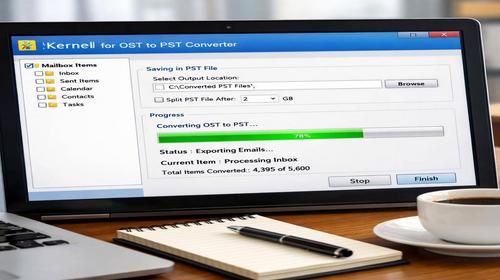
Step 4 – configure export and convert. Select PST format and choose a location to save the file. For large files enable split option to avoid Outlook limits. You can also export directly to Outlook. Start the conversion process and wait until it finishes. The duration depends on file size and system performance.
Step 5 – check the result. Open Outlook and import the PST file using the import feature. Verify emails, contacts and other data. If everything appears correctly, the conversion is successful. It is recommended to create a backup for safety.
Useful tips
- Always create a backup of the OST file before starting
- Use deep scan for damaged files
- Split large PST files for better Outlook performance
- Remove temporary files after conversion
- Keep the program updated for better compatibility
Common program errors
Windows users often face errors when OST files are corrupted due to improper shutdown or server issues. Another common issue is access denied when the program is not run as administrator. If the conversion freezes, increase virtual memory in system settings. When PST file size exceeds limits, use the split option. To maintain stability, regularly clean Outlook cache using system commands.
Frequently asked questions
Does this work on other Windows versions?
Yes, the program supports Windows 7, 8, 10 and 11, including both 32 bit and 64 bit systems.
Will this affect computer performance?
No, the program uses minimal system resources and does not block normal operations.
Does this work on laptops?
Yes, it works fully on laptops running Windows.
Do I need to restart the computer after changes?
No, restarting Outlook is enough after conversion.
Do I need to remove the old version before installing?
Yes, it is recommended to uninstall older versions to avoid conflicts.
Can Windows updates cause this issue?
Sometimes updates may affect Outlook functionality, so compatibility should be checked.
How to check if the problem is solved?
Import the PST file into Outlook and verify that all data is accessible.
Can I use older versions of the program?
It is not recommended because older versions may not support newer file formats.
What to do if the problem appears again?
Check the OST file, create a new Outlook profile and repeat the conversion process.
Conclusion
Kernel for OST to PST Converter is a reliable tool for converting OST to PST, editing data and transferring emails. By following the steps and recommendations, you can avoid errors and ensure stable Outlook performance in Windows.