Fake VPN Apps — How Fake VPN Services Work and Why VPN Scams Are Dangerous
Short description: Does a free VPN ask for suspicious permissions, display excessive ads, slow down your internet or steal accounts? This may be a fake VPN — a dangerous application pretending to be a legitimate VPN service. Below you will learn how VPN scams work, why fake VPN apps are dangerous and how to check VPN software before installing it.
VPN services became extremely popular because of:
- bypassing restrictions;
- accessing blocked websites;
- Wi-Fi protection;
- streaming services;
- Telegram and Discord access;
- online anonymity.
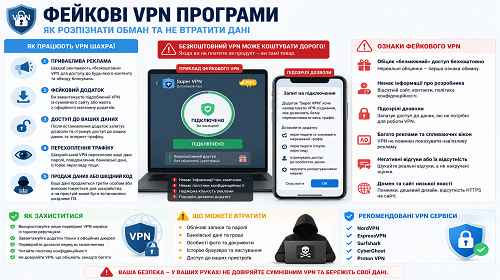
Because of this popularity, cybercriminals actively create fake VPN apps that:
- steal personal data;
- display advertisements;
- intercept traffic;
- collect passwords;
- install malware;
- use devices in botnets.
When this problem usually appears
Users commonly notice symptoms such as:
- VPN showing excessive ads;
- browser redirects to suspicious websites;
- constant pop-up windows;
- fast battery drain on smartphones;
- VPN asking for suspicious permissions;
- browser becoming slower;
- missing accounts or passwords.
Some dangerous fake VPN apps may:
- intercept internet traffic;
- steal cookies;
- log passwords;
- install spyware;
- infect Android or Windows devices.
In some cases, VPN scams may turn a device into part of a botnet.
The fastest way to check a VPN
If you suspect a dangerous VPN:
- Remove the suspicious VPN immediately.
- Run a full antivirus scan.
- Change important passwords.
- Check browser extensions.
- Clear browser cookies.
The faster you react, the lower the risk of data leaks.
How VPN scams work
| Stage | What happens | Main goal |
|---|---|---|
| 1 | User installs a fake VPN | Gain access to traffic |
| 2 | VPN collects user data | Steal information |
| 3 | Ads and redirects appear | Generate profit |
| 4 | Malware or spyware gets installed | Control the device |
| 5 | User data gets sold | Financial profit |
Why fake VPN apps are dangerous
A dangerous VPN may:
- read internet traffic;
- capture passwords;
- steal cookies;
- replace websites;
- display phishing pages;
- install malware.
Especially dangerous are:
- free VPNs without reputation;
- VPN apps full of advertisements;
- VPN APK files from unknown websites;
- cloned VPN applications;
- fake VPN browser extensions.
Step-by-step guide — what to do if you installed a fake VPN
- Remove the VPN application.
Completely uninstall the suspicious VPN from your device. - Check browser extensions.
VPN malware often installs:- browser hijackers;
- adware;
- tracking extensions.
- Scan your PC or smartphone with antivirus software.
Recommended tools:- Microsoft Defender;
- Malwarebytes;
- ESET Online Scanner;
- Bitdefender.
- Change important passwords.
Especially:- Google accounts;
- Steam;
- Discord;
- banking accounts;
- email accounts.
- Clear cookies and browser sessions.
Fake VPNs may steal browser sessions. - Check DNS settings.
Some VPN scam apps modify DNS settings. - Inspect startup entries.
Malware may automatically launch with Windows.
How to check your system after a VPN scam
Possible infection signs include:
- browser redirects to ads;
- constant pop-up windows;
- Chrome becoming slow;
- new suspicious extensions;
- high CPU usage;
- antivirus disabling itself;
- unusual network traffic.
You should also inspect:
- browser extensions;
- Task Scheduler;
- Startup apps;
- Autoruns;
- DNS settings.
Useful tips and hidden tricks
- Never install VPN software from random websites.
- Use VPN services with a trusted reputation.
- Avoid “free unlimited VPN” apps.
- Do not manually install VPN APK files without verification.
- Always read app permissions before installation.
- A lesser-known trick: some fake VPN apps do not encrypt traffic at all.
- Use 2FA for important accounts.
- Regularly review browser sessions.
Common user mistakes
Mistake 1 — “free VPN without ads”
Many scam VPN services make money by selling user data.
Mistake 2 — installing APK files from websites
This is one of the most common methods used to spread Android malware.
Mistake 3 — ignoring permissions
A VPN application should not request access to SMS messages or contacts.
Mistake 4 — storing passwords in browsers
Browser malware may easily steal cookies and passwords.
Legitimate VPN vs fake VPN
| Feature | Legitimate VPN | Fake VPN |
|---|---|---|
| Encryption | Present | May be missing |
| Advertisements | Minimal | Excessive |
| Data collection | Limited | Massive |
| Malware risk | No | Possible |
| Account security | Higher | Dangerous |
Frequently Asked Questions
Can VPN apps steal passwords?
Yes, especially fake VPN applications or browser malware.
Are free VPNs dangerous?
Not all of them, but many free VPNs make money from user data.
Can a VPN infect a PC?
Yes, if it is a fake VPN containing malware.
What is VPN phishing?
It is a phishing or scam scheme using fake VPN services.
Should Windows be reinstalled?
In malware or spyware cases, reinstalling Windows may be the safest option.
Can fake VPNs steal cookies?
Yes, especially through browser extensions or spyware.
How can you identify a dangerous VPN?
Excessive ads, redirects, suspicious permissions and unstable system behavior are major warning signs.
Read also
Bookmarks
If this article was helpful, bookmark our blog
about cybersecurity and online protection.
Press Ctrl + D