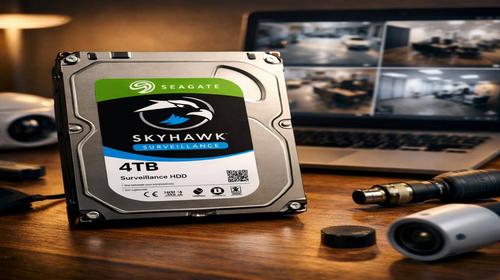
Hard Drive for Video Surveillance: How to Choose the Right HDD for DVR and NVR Systems
Short description: A hard drive for video surveillance must operate 24/7, handle continuous video recording, and store large amounts of footage reliably. In this guide, you’ll learn how surveillance HDDs differ from standard desktop drives, how much storage you need, when to use an external drive for backups, and which HDD models are best suited for home and business security systems.
A video surveillance system is only as reliable as the storage device behind it. Even the most advanced security cameras become useless if the recorded footage is missing, corrupted, or inaccessible when needed. This is why choosing the right hard drive is one of the most important decisions when building a CCTV system.
Today, surveillance systems are used in homes, apartment buildings, offices, warehouses, retail stores, parking lots, schools, and industrial facilities. In all these environments, the storage drive must continuously record video streams around the clock without interruptions.
Unlike traditional desktop drives, surveillance HDDs are specifically designed to handle constant write operations, multiple camera streams, and long-term reliability. They are optimized for DVR and NVR systems and can operate under heavy workloads for years.
In this article, we’ll explain how to choose the best hard drive for video surveillance, estimate storage requirements, set up backup solutions, and avoid common mistakes that can lead to data loss.
What Is a Video Surveillance Hard Drive?
A video surveillance hard drive is a storage device specifically engineered for continuous video recording. Unlike standard HDDs found in desktop computers, surveillance drives are optimized for 24/7 operation and can process multiple video streams simultaneously.
Manufacturers such as Western Digital and Seagate have developed dedicated product lines designed for CCTV environments. These drives include firmware enhancements that prioritize video recording, reduce frame loss, and improve overall reliability.
Popular examples include:
- WD Purple series.
- WD Purple Pro series.
- Seagate SkyHawk series.
- Seagate SkyHawk AI series.
These drives are specifically built to handle workloads generated by modern security cameras and AI-powered video analytics systems.
Why Standard Desktop HDDs Are Not Recommended
Many users try to save money by installing an old desktop hard drive into a DVR or NVR. While this may work initially, standard HDDs are not designed for continuous surveillance workloads.
Common issues include:
- Higher risk of drive failure.
- Frame drops during recording.
- Overheating under constant load.
- Reduced lifespan.
- Increased chance of data corruption.
A desktop drive typically experiences periods of activity and inactivity. A surveillance drive, on the other hand, is expected to write data continuously, often every second of every day.
When Do You Need a Dedicated Surveillance HDD?
A specialized surveillance drive becomes essential in the following situations:
- More than two cameras are recording simultaneously.
- The system records 24/7.
- Cameras capture footage in Full HD, 2K, or 4K resolution.
- Long-term video retention is required.
- The system is used in a business environment.
- AI-based analytics or facial recognition are enabled.
As camera counts and resolutions increase, storage requirements grow rapidly, making dedicated surveillance drives a necessity rather than an option.
Best Hard Drives for Video Surveillance in 2026
| Drive Model | Capacity Range | Workload Rating | Recommended Use |
|---|---|---|---|
| WD Purple | 1–22 TB | Up to 180 TB/year | Home and small business CCTV systems |
| WD Purple Pro | 8–24 TB | Up to 550 TB/year | AI-enabled surveillance systems |
| Seagate SkyHawk | 1–20 TB | Up to 180 TB/year | DVR and NVR installations |
| Seagate SkyHawk AI | 8–24 TB | Up to 550 TB/year | Advanced enterprise surveillance |
For most home installations with 4 to 8 cameras, a 4 TB to 8 TB WD Purple or Seagate SkyHawk drive is usually sufficient.
How Much Storage Do You Need?
One of the most common mistakes is underestimating storage requirements.
The amount of space required depends on:
- Number of cameras.
- Video resolution.
- Recording mode.
- Frame rate.
- Retention period.
General estimates:
- 4 Full HD cameras: approximately 1 TB for 7–10 days of recording.
- 8 Full HD cameras: 2–4 TB for around two weeks of footage.
- 16 Full HD cameras: 6–8 TB or more.
- 4K cameras may require three to five times more storage.
If your goal is to keep recordings for 30 days or longer, drives with capacities of 8 TB or higher are often the best choice.
Installing a Hard Drive in a DVR or NVR
- Power off the recorder completely.
- Open the DVR or NVR enclosure.
- Mount the hard drive using the supplied brackets.
- Connect SATA data and power cables.
- Close the enclosure and power on the system.
- Open the storage settings menu.
- Format the new drive.
- Verify that recording has started successfully.
Most modern recorders automatically detect newly installed surveillance drives.
Using an External Drive for Backup Storage
Even the most reliable hard drive can fail unexpectedly. That’s why important surveillance footage should be backed up regularly to an external drive.
Backup storage is especially important for:
- Businesses.
- Retail stores.
- Warehouses.
- Parking facilities.
- Residential properties with valuable assets.
Most DVR and NVR systems support exporting footage directly to USB storage devices.
How to Back Up Surveillance Footage
- Connect a USB external drive to the recorder.
- Open the archive or playback menu.
- Select the desired time range.
- Choose the cameras to export.
- Select the USB device as the destination.
- Start the backup process.
- Verify the files on a computer after completion.
For large archives, USB 3.0 or USB 3.2 external drives are highly recommended.
Useful Tips for Long-Term Reliability
- Use an uninterruptible power supply (UPS).
- Monitor internal temperatures regularly.
- Keep DVR and NVR units free from dust.
- Check SMART health data periodically.
- Test backup procedures regularly.
- Avoid operating drives at full capacity for extended periods.
Maintaining proper airflow can significantly increase the lifespan of both the hard drive and the recorder.
Common Mistakes to Avoid
Many surveillance storage problems are caused by simple configuration errors.
- Using old desktop HDDs instead of surveillance-rated drives.
- Choosing insufficient storage capacity.
- Ignoring backup procedures.
- Failing to monitor drive health.
- Using poor-quality SATA cables.
- Ignoring SMART warnings.
- Operating drives in poorly ventilated environments.
These mistakes often lead to missing footage exactly when it is needed most.
FAQ
Which is better: WD Purple or Seagate SkyHawk?
Both product lines are specifically designed for surveillance systems. Performance differences are generally small, and the best choice often depends on pricing, availability, and personal preference.
Can I use an SSD for video surveillance?
Yes, but SSDs are usually not cost-effective for large surveillance archives. HDDs continue to offer significantly lower costs per terabyte.
How long does a surveillance hard drive last?
A quality surveillance HDD typically lasts between three and seven years depending on workload, operating conditions, and environmental factors.
How can I check drive health?
Tools such as CrystalDiskInfo, Hard Disk Sentinel, and manufacturer utilities can monitor SMART values, temperature, and overall drive condition.
When should a surveillance HDD be replaced?
Replacement is recommended if SMART errors appear, unusual noises develop, recording failures occur, or the drive has exceeded its expected service life.
Is an external backup drive necessary?
Yes. If surveillance footage may be needed for legal, insurance, or security purposes, maintaining separate backups is strongly recommended.
Conclusion
A hard drive for video surveillance is one of the most critical components of any CCTV system. Choosing a dedicated surveillance HDD such as WD Purple or Seagate SkyHawk helps ensure reliable recording, reduced frame loss, and long-term stability.
Combining a surveillance-grade HDD with regular backups to an external drive provides the best protection against hardware failures and data loss. With proper planning, installation, and maintenance, your surveillance system can operate reliably for many years while preserving valuable video evidence whenever it is needed.
Related Articles
Find more useful guides in the following sections:
Bookmarks
If you found this guide useful, save it to your browser bookmarks so you can quickly access it whenever you need information about surveillance storage systems.
Press Ctrl + D to add this page to your favorites.