Telegram Scams: How These Frauds Work and How to Protect Your Account
Short description: Learn how Telegram scams, phishing attacks, and account theft work — and how to quickly secure your account and personal data.
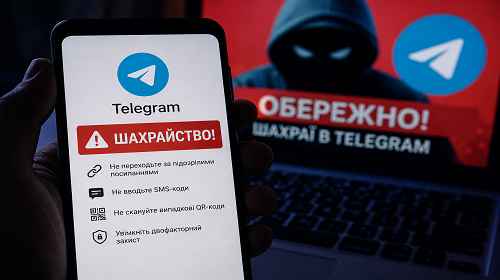
Telegram has become one of the most popular platforms for communication, work, news, and communities. But as its popularity grows, scammers are increasingly using it for phishing, account theft, and financial fraud.
In recent years, users have frequently encountered:
- stolen Telegram accounts;
- fake login pages;
- malicious bots;
- “vote for a child” scams;
- fake crypto investments;
- SMS code theft.
The main problem is that many people trust Telegram more than regular websites or emails, which makes them less careful when opening links or entering codes.
In this article, we’ll explain:
- how Telegram scams work;
- how accounts get hacked;
- how Telegram phishing works;
- what to do if your account was compromised;
- how to secure your Telegram account properly.
When This Becomes Important
- You received a suspicious Telegram message
- Someone asks you to open a link
- You received a “vote” or “gift” request
- Telegram asks you to re-enter a login code
- You suspect your account was hacked
The Most Common Telegram Scam Schemes
1. “Vote for a Child” Scam
This is one of the most widespread Telegram scams today.
The victim receives a message from a friend or acquaintance:
- “Please vote for my niece”
- “Help win a contest”
- “We only need one more vote”
After clicking the link, the user sees a fake website that looks almost identical to Telegram.
The site then asks the victim to:
- log in with Telegram;
- enter a phone number;
- enter the SMS verification code.
At that moment, scammers gain access to the account.
2. Telegram Phishing
Phishing involves fake websites or bots that imitate Telegram.
These pages often look nearly identical to the real platform.
Scammers commonly use:
- fake domains;
- copied Telegram logos;
- fake login pages;
- fake support bots.
Their goal is to trick users into entering:
- their phone number;
- SMS verification codes;
- two-factor authentication passwords.
3. QR Code Account Theft
Telegram supports login through QR codes, which scammers actively abuse.
Victims receive QR codes with messages such as:
- “Confirm your account”
- “Get Telegram Premium”
- “Login to continue”
After scanning the QR code, the account may become linked to the scammer’s device.
4. Fake Crypto Investments
Telegram is heavily used by cryptocurrency scammers.
Common schemes include:
- fake traders;
- “guaranteed profits”;
- secret trading signals;
- fake investment channels;
- crypto giveaways.
In most cases, once money is transferred, the scammer disappears.
Fastest Protection Method (1 Minute)
- Enable Telegram two-factor authentication
- Never enter SMS codes on third-party websites
- Avoid suspicious links
- Check website domains carefully
- Review active Telegram sessions
Method 1 — Enable Telegram Two-Step Verification
- Open Telegram
- Go to “Settings”
- Open “Privacy and Security”
- Select “Two-Step Verification”
- Create a strong password
This is one of the most important protections against account theft.
Method 2 — Check Active Sessions
Telegram allows you to see all devices connected to your account.
- Open “Settings”
- Go to “Devices”
- Review active sessions
- Terminate suspicious devices
If you see an unknown device, immediately terminate the session and change your password.
Method 3 — How to Recognize Telegram Phishing
There are several common warning signs of fake Telegram pages:
- strange domains;
- grammar mistakes;
- requests for SMS codes;
- requests for passwords;
- suspicious shortened links.
The real Telegram website never asks you to enter verification codes on third-party pages.
Method 4 — What to Do If Your Account Was Hacked
- Immediately terminate all active sessions
- Enable two-step verification
- Change recovery email settings
- Warn your contacts
- Review connected bots and apps
You should also check whether scammers sent phishing messages from your account.
Useful Tips
- Never enter SMS codes on unknown websites
- Do not scan random QR codes
- Enable Telegram 2FA
- Do not trust “guaranteed profit” schemes
- Regularly review active sessions
Common Mistakes
The most common mistake is trusting messages from friends automatically. Very often those accounts are already compromised.
Another dangerous mistake is entering SMS codes on fake websites.
It is also risky to:
- install unofficial Telegram mods;
- use pirated Telegram clients;
- disable two-factor authentication.
Frequently Asked Questions
Can Telegram be hacked without SMS?
Yes. For example, through malicious QR codes or already authorized sessions.
Does two-factor authentication help?
Yes. It is one of the most effective protections available.
Is Telegram itself secure?
Telegram is generally secure. Most problems come from phishing and human mistakes.
Can scammers send messages from my friends’ accounts?
Yes. That is exactly how many Telegram scams spread.
Conclusion
Telegram scams have become one of the most common methods for stealing accounts, personal information, and money.
The best protection is staying cautious, enabling two-factor authentication, and carefully checking every link before logging in.
Read Also
Bookmarks
If this article was useful, bookmark our blog about
internet security and account protection.
Press Ctrl + D