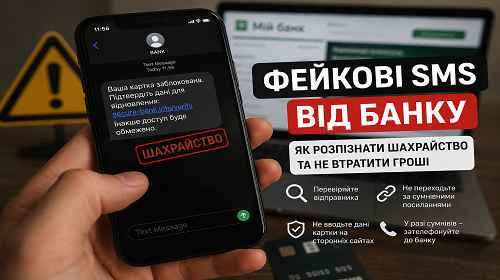
Fake Bank SMS Messages — How to Detect SMS Scams and Protect Your Money
Short description: Have you received an SMS supposedly from your bank about a blocked card, suspicious transaction or urgent account verification? Criminals actively use fake banking messages to steal money, payment card details and online banking access. Below are real examples of SMS phishing attacks, practical protection methods and ways to verify suspicious messages safely.
Fake banking SMS attacks have become one of the most common forms of cyber fraud. Modern scammers no longer rely only on random messages. They imitate real banks, use fake support numbers, phishing websites and even malicious Android applications disguised as security tools or banking updates.
Many users lose access to their accounts not because of technical hacks, but because panic forces them to click dangerous links or reveal verification codes themselves.
When this problem usually happens
Fake SMS messages often look convincing and create urgency. Common examples include:
- “Your bank card has been blocked”;
- “Suspicious transaction detected”;
- “Urgent identity verification required”;
- “Your account will be suspended”;
- links to fake online banking pages;
- requests to call a fake security department;
- messages threatening automatic money withdrawal.
One of the biggest dangers is SMS spoofing. In some cases, phishing messages appear inside the same SMS thread as legitimate bank notifications.
Scammers rely on stress, fear and urgency. The faster a victim reacts emotionally, the easier it becomes to steal banking information.
The fastest way to verify a suspicious SMS
If you receive a suspicious banking message:
- Do not click the link inside the SMS.
- Do not call the phone number provided in the message.
- Open your official banking application manually.
- Check your account activity directly inside the app.
- If necessary, contact the bank using the official number printed on your card or listed on the official website.
In most situations, this immediately reveals whether the message is fake.
How fake banking SMS scams work
Most SMS phishing attacks follow a similar structure:
| Stage | What scammers do | Main goal |
|---|---|---|
| 1 | Send an alarming SMS message | Create panic and urgency |
| 2 | Provide a malicious link or fake phone number | Redirect the victim to phishing infrastructure |
| 3 | Ask for banking credentials | Steal account access |
| 4 | Request SMS verification codes | Confirm money transfers |
| 5 | Gain full banking access | Steal money or apply for loans |
Step-by-step guide — what to do after receiving a fake SMS
- Check the sender carefully.
Scammers often use:- similar-looking bank names;
- modified letters and symbols;
- foreign phone numbers;
- short SMS sender IDs.
- Never open suspicious links.
A malicious link may:- open a phishing website;
- download malware to Android;
- install a fake APK file;
- steal authentication cookies or tokens;
- trigger malicious browser scripts.
- Verify the website domain.
Fraudulent domains often look like:- bank-support-login.com
- secure-bank-alert.net
- bank-verification-security.info
Legitimate banks usually use short official domains without additional words.
- Never share:
- CVV numbers;
- PIN codes;
- SMS verification codes;
- online banking passwords;
- Google Authenticator codes.
- Enable two-factor authentication.
Even if criminals obtain your password, additional verification significantly reduces the risk of account compromise.
Why Android users are targeted more often
Android devices are frequently attacked because the system allows APK installation from third-party sources.
Scammers actively distribute:
- fake banking applications;
- banking trojans;
- SMS interception malware;
- fake security updates;
- malicious accessibility tools.
After installation, malicious software may:
- read SMS messages;
- capture banking push notifications;
- intercept verification codes;
- control the device remotely;
- overlay fake login windows on top of real banking apps.
Many dangerous APK files pretend to be:
- bank updates;
- security scanners;
- delivery services;
- payment verification tools;
- antivirus applications.
How to check your smartphone after opening a suspicious SMS
If you already clicked a suspicious link:
- Disable Internet access immediately.
- Check recently installed applications.
- Remove unknown APK files.
- Inspect Accessibility permissions.
- Run a full antivirus scan.
- Change your banking password.
- Contact your bank immediately.
Useful tips and hidden tricks
- Never open banking links directly from SMS messages. Always launch the official app manually.
- Disable APK installation from unknown sources on Android.
- If an SMS creates panic or pressure, treat it as suspicious immediately.
- Use a separate virtual card for online purchases with a limited balance.
- Check website domains manually before entering login credentials.
- A useful hidden trick: many banks allow disposable virtual cards for online payments. This dramatically reduces the risk of losing money from your main account.
- Enable anti-phishing protection inside Chrome, Edge or other browsers.
- Keep Android and iPhone security updates installed to reduce exploit risks.
Common user mistakes
Mistake 1 — panicking after receiving the SMS
Scammers intentionally use phrases like:
- “urgent action required”;
- “account blocked”;
- “payment in progress”;
- “verify immediately”.
The goal is to force victims into reacting emotionally.
Mistake 2 — clicking links without verification
Even opening a phishing page may expose old Android devices to additional risks.
Mistake 3 — sharing verification codes
Legitimate banks never ask for SMS verification codes by phone.
Mistake 4 — installing APK files from SMS links
Fake banking updates are often banking trojans designed to steal credentials.
Real bank SMS vs fake phishing SMS
| Feature | Legitimate bank SMS | Fake phishing SMS |
|---|---|---|
| Links | Rarely used | Usually included |
| Message tone | Neutral | Urgent and alarming |
| Requests for CVV | Never | Very common |
| Grammar mistakes | Rare | Common |
| APK files | Never sent | May be attached |
Frequently Asked Questions
Can scammers send SMS messages using a real bank name?
Yes. SMS spoofing allows criminals to imitate legitimate sender names.
What should I do if I already entered my card information?
Block the card immediately through the banking app or by contacting the bank.
Is it dangerous to simply open the SMS?
Usually no. The real danger begins after clicking links or installing files.
Can antivirus software help on Android?
Yes. Good mobile antivirus solutions can detect banking trojans and phishing websites.
Why do attackers target Android devices more often?
Android allows third-party APK installation, which creates additional attack vectors.
Can scammers steal money without SMS codes?
In some cases yes, especially through malware, push notification abuse or stolen session tokens.
Should I reply to suspicious SMS messages?
No. It is safer to delete the message and verify information directly with your bank.
Read also
Bookmarks
If this article was helpful, bookmark our blog
about cybersecurity and Internet protection.
Press Ctrl + D