How to Register and Activate a FortiGate License in FortiCloud
Short description: Learn how to register FortiGate in FortiCloud, activate FortiCare and FortiGuard services, avoid the Invalid input data error, and check the license status after registration.
After purchasing a new FortiGate firewall or renewing a FortiCare or FortiGuard subscription, the administrator receives a Service Registration Document. This document contains the contract registration code that must be entered in FortiCloud to activate the services.
A common mistake is entering the service SKU instead of the registration code. A SKU usually looks like FC-**-****-***-**-**. This is not the activation code. If you enter it in FortiCloud, you may see the error: Invalid input data: Please enter a valid registration number.
When you need to register a FortiGate license
Registration is required after buying a new FortiGate device, renewing FortiCare, activating FortiGuard, or enabling services such as IPS, Antivirus, Web Filter, Application Control, and FortiOS updates.
If the contract is not registered, Fortinet may automatically start the license term or the service may expire according to the current Fortinet activation policy.
The fastest way
- Open the FortiCloud portal or the Fortinet Welcome page.
- Sign in to your FortiCare or FortiCloud account.
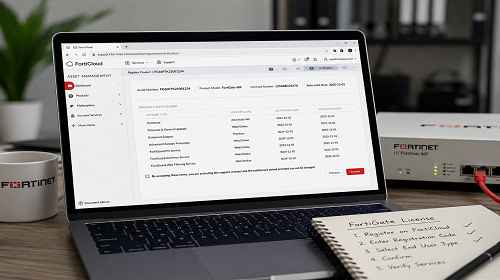
- Click Register Now or Register Product.
- Enter the Contract Registration Code, not the SKU in the format FC-**-****-***-**-**.
- In the End User Type field, select A non-government user if the FortiGate is used by a private company, sole proprietor, LLC, or home user.
- Check the model, serial number, contract start date, and expiration date.
- Accept the terms and click Confirm.
Step-by-step guide
- Find the correct code in the document. Open the Service Registration Document and look for Contract Registration Code or Registration Code. This is the code you need to enter in FortiCloud.
- Do not confuse the code with the license SKU. A number such as FC-**-****-***-**-** is usually a SKU or Part Number. It is not an activation code, so FortiCloud may reject it.
- Select the correct End User Type. Choose A government user only for government agencies, ministries, municipalities, public hospitals, public universities, or military organizations. For private business, LLC, sole proprietor, or home use, choose A non-government user.
- Check the details before confirmation. FortiCloud will show the FortiGate model, serial number, contract number, activation date, and service expiration date.
- Confirm the registration. After clicking Confirm, the contract will be linked to your FortiGate device.
How to check the license on FortiGate
After registration, open the FortiGate web interface and check the License Information or FortiGuard Services section.
You can also check the status through CLI:
get system status
diagnose autoupdate versions
To force FortiGate to update the service status, run:
execute update-now
Useful tips
- Keep the Service Registration Document separately from invoices and quotations because it contains the activation code.
- Do not register a corporate FortiGate under a personal employee email address. Use a company-controlled account.
- Before clicking Confirm, carefully check the FortiGate serial number.
- If the license is a renewal, verify that the new term has been added to the existing contract.
- After activation, run execute update-now so the FortiGate updates the FortiCare and FortiGuard status faster.
Common mistakes
The most common mistake is entering a number like FC-**-****-***-**-** instead of the actual registration code. Because of this, FortiCloud shows the message Invalid input data.
Another common issue is selecting the wrong End User Type. A regular company, sole proprietor, LLC, or home user should not select A government user.
Also, do not close the confirmation page before checking the FortiGate serial number, model, and contract expiration date.
Frequently Asked Questions
What is a Contract Registration Code?
It is the code used to activate FortiCare or FortiGuard services in FortiCloud.
Why does FortiCloud not accept my code?
Most often, the user enters a SKU or product number such as FC-**-****-***-**-** instead of the actual Registration Code.
What should I choose in End User Type?
For a private company, sole proprietor, LLC, or home use, select A non-government user.
Do I need to reboot FortiGate after activation?
Usually, no. It is enough to refresh the service status through the web interface or run execute update-now.
Where can I check the license expiration date?
The expiration date is shown in FortiCloud and in the License Information section on FortiGate.
Can I activate a renewal before the current license expires?
Yes, usually the renewal is added to the existing license term, but you should always verify this after registration.
What should I do if the contract was linked to the wrong FortiGate?
Contact Fortinet support or the supplier from whom the license was purchased.
Related Articles
Bookmarks
Save this guide so you can quickly return to it during FortiGate license registration or renewal.
Press Ctrl + D to add this page to your bookmarks.