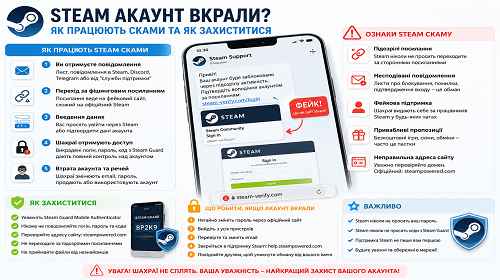
Steam Account Stolen — How to Recover Your Account and Protect Yourself from Steam Phishing
Short description: Cannot log into Steam, your email or password was changed, items disappeared or suspicious trade offers appeared? This may be a Steam phishing or Steam scam attack. Below you will learn how Steam account theft works, how to recover your account quickly and how to protect yourself from future attacks.
Steam accounts have become a major target for cybercriminals because they often contain:
- expensive skins;
- CS2 inventory items;
- game libraries;
- Steam Wallet balance;
- linked payment cards;
- rare in-game items.
Most Steam accounts are stolen through:
- Steam phishing websites;
- fake trade offers;
- fake Steam login pages;
- malware and stealers;
- fake Discord messages;
- browser hijackers;
- fake tournaments and giveaways.
When this problem usually appears
Most users notice symptoms such as:
- Steam password no longer works;
- email address was changed;
- skins disappeared;
- Steam Guard stopped working;
- suspicious trades appeared;
- the account sends messages automatically;
- phone number was changed.
Some dangerous Steam phishing attacks can:
- steal browser cookies;
- capture Steam sessions;
- bypass Steam Guard;
- steal Steam API keys;
- use browser malware.
In some situations, attackers can access a Steam account even without the password by using stolen browser cookies.
The fastest way to secure your Steam account
If you suspect your Steam account was hacked:
- Change your Steam password immediately.
- Log out from all devices.
- Check your Steam API key.
- Reset Steam Guard.
- Run a full antivirus scan.
The faster you react, the higher the chance of saving your inventory.
How Steam phishing works
| Stage | What happens | Main goal |
|---|---|---|
| 1 | User opens a fake Steam website | Steal login data |
| 2 | User enters Steam password | Hijack account |
| 3 | Attackers steal cookies or API key | Bypass Steam Guard |
| 4 | Trades and item sales begin | Steal inventory |
| 5 | Account is resold or reused | Generate profit |
Why Steam scams are dangerous
A Steam account may contain:
- valuable skins;
- CS2 inventory;
- Dota 2 items;
- Steam Wallet funds;
- linked payment cards;
- rare game collections.
Additionally, stealers may also collect:
- browser cookies;
- Discord tokens;
- Telegram sessions;
- Google account access;
- banking information.
Especially dangerous scams include:
- Steam API scam;
- fake trade bots;
- Discord Steam scams;
- browser stealers;
- fake tournament phishing.
Step-by-step guide — what to do if your Steam account was stolen
- Change your Steam password.
If you still have access, do it immediately. - Log out from all sessions.
Use the logout from all devices option inside Steam settings. - Check your Steam API key.
Attackers often use API scams to replace trade offers. - Change your email password.
If your email is compromised, the account may be stolen again. - Scan your PC for malware.
Recommended tools:- Microsoft Defender;
- Malwarebytes;
- ESET Online Scanner;
- KVRT.
- Contact Steam Support.
Especially if:- email was changed;
- inventory was stolen;
- account access was lost;
- phone number was modified.
- Check your browser.
Stealers often target:- cookies;
- saved passwords;
- Steam sessions.
How to check your PC after Steam phishing
Possible infection signs include:
- browser redirects to Steam scam sites;
- unknown extensions appeared;
- Steam logs out automatically;
- strange trades occur;
- Discord sends spam messages;
- Chrome becomes unstable;
- antivirus protection disables itself.
You should also inspect:
- browser extensions;
- Task Scheduler;
- Autoruns;
- Startup apps;
- saved passwords.
Useful tips and hidden tricks
- Never log into Steam through suspicious websites.
- Always verify the Steam login page domain.
- Do not open “tournament invitations” from Discord messages.
- Use a separate browser profile for Steam whenever possible.
- Enable Steam Guard Mobile Authenticator.
- A lesser-known trick: Steam API scams may continue even after changing the password.
- Regularly inspect your Steam API key settings.
- Avoid storing important passwords directly in browsers.
Common user mistakes
Mistake 1 — logging into fake Steam websites
Steam phishing pages often look almost identical to the real Steam website.
Mistake 2 — ignoring Steam API keys
Even after changing the password, API scams may still remain active.
Mistake 3 — not using Steam Guard
Without Steam Guard, accounts are much easier to steal.
Mistake 4 — infected browser
Browser stealers may steal Steam cookies again.
Real Steam login vs Steam phishing
| Feature | Real Steam | Steam phishing |
|---|---|---|
| Domain | Official Steam domain | Fake similar-looking domain |
| HTTPS | Present | May be fake |
| Trade offers | Normal | Suspicious |
| Discord links | Rare | Common |
| API scams | No | Yes |
Frequently Asked Questions
Can a stolen Steam account be recovered?
Yes. Steam Support can often restore access, especially if you still have access to the original email or purchase history.
Why did Steam Guard not protect the account?
Some Steam phishing attacks steal cookies or Steam API keys instead of passwords.
What is a Steam API scam?
It is a trade manipulation method using the account’s API key.
Can attackers steal a Steam account without the password?
Yes, through stolen cookies or browser stealers.
Does changing the password help?
Yes, but you should also inspect your API key and browser security.
Should Windows be reinstalled?
In cases involving browser stealers, reinstalling Windows may be the safest option.
Why is Discord commonly used in Steam scams?
Because it is easy to spread phishing links and fake tournament invitations through Discord messages.
Read also
Bookmarks
If this article was helpful, bookmark our blog
about cybersecurity and account protection.
Press Ctrl + D